Give Your Wholesale Customers a Portal to Order From — Any Time
Every phone call, email, and WhatsApp order is a chance for something to get missed. Order Hub gives your trade and wholesale customers a dedicated online portal to browse your catalogue, build a basket, and submit orders whenever suits them — while every order lands straight in your system, ready to fulfil.
A Dedicated Ordering Portal for Your Trade Customers
Order Hub sits alongside your existing sales process — it doesn't replace your relationship with your customers, it just removes the admin from the ordering itself.
Self-Service Ordering
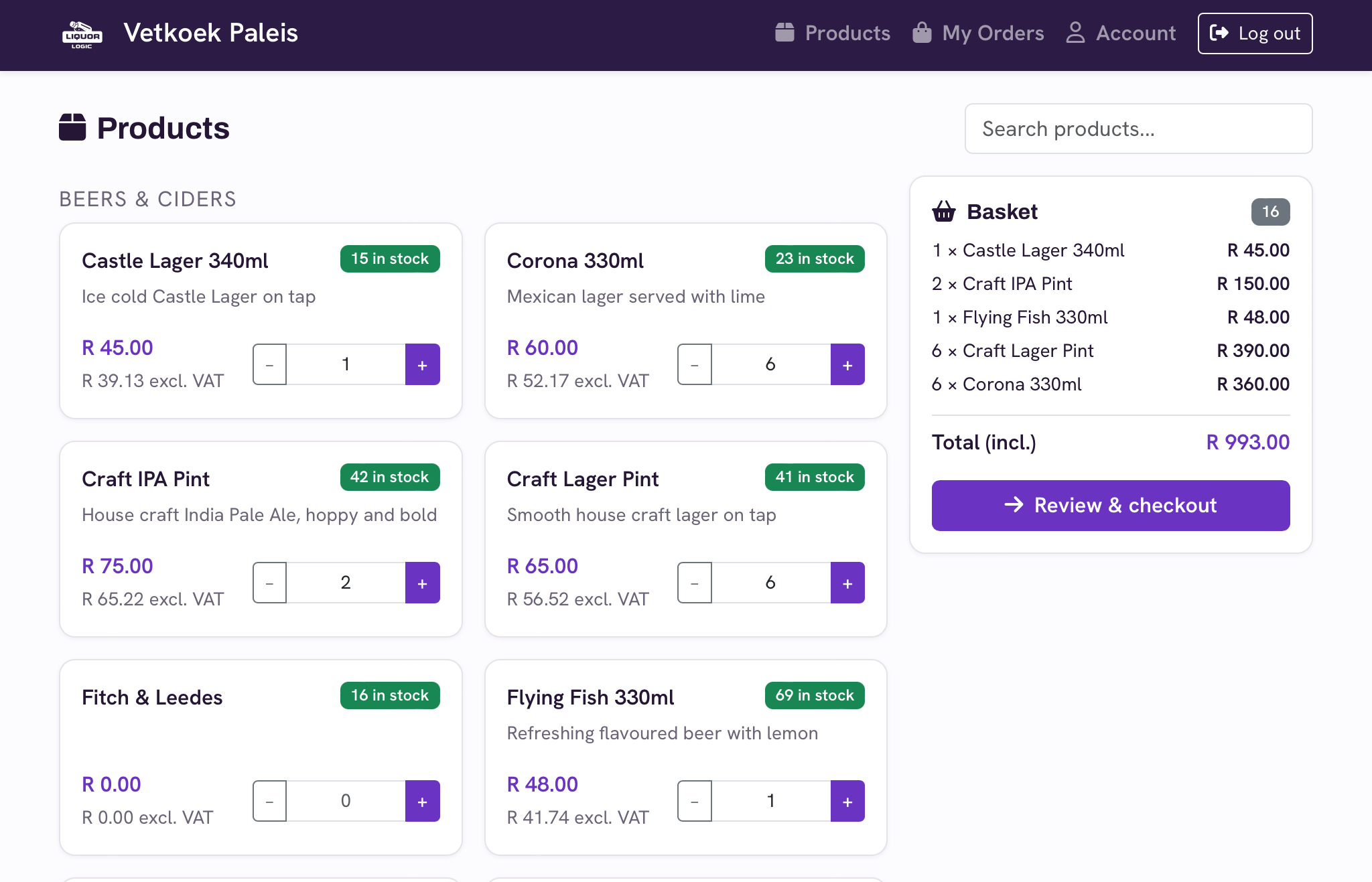
Customers log in, browse the products you've made available to them, and build up an order in their own time.
Live Basket Visibility
Your team can see baskets building in real time — nothing arrives as a surprise, and you can follow up before an order is even submitted.
Controlled Access
Customers request access, you approve it. You decide exactly who gets a login and what they can see and order.
Straight Into Your System
No re-typing. Every submitted order becomes a real order in Liquor Logic, tagged so your team can spot it instantly.
Let Customers Order When It Suits Them — Not Just During Office Hours
Your trade customers don't all keep the same hours you do. A restaurant manager doing stock at 11pm, or a bottle store owner planning next week's order on a Sunday, shouldn't have to wait for your phones to open. Order Hub gives every approved customer their own login to a branded ordering portal, available whenever they need it.
Customers see only the products, pricing, and availability you've chosen to show them — so the portal always reflects exactly what you want your trade customers ordering, no more and no less.
- Available 24/7 — no waiting on phone lines or email replies
- Customers build and adjust their basket at their own pace
- Product images and details shown right in the catalogue
- Delivery address captured with every order
You Decide Who Gets a Login
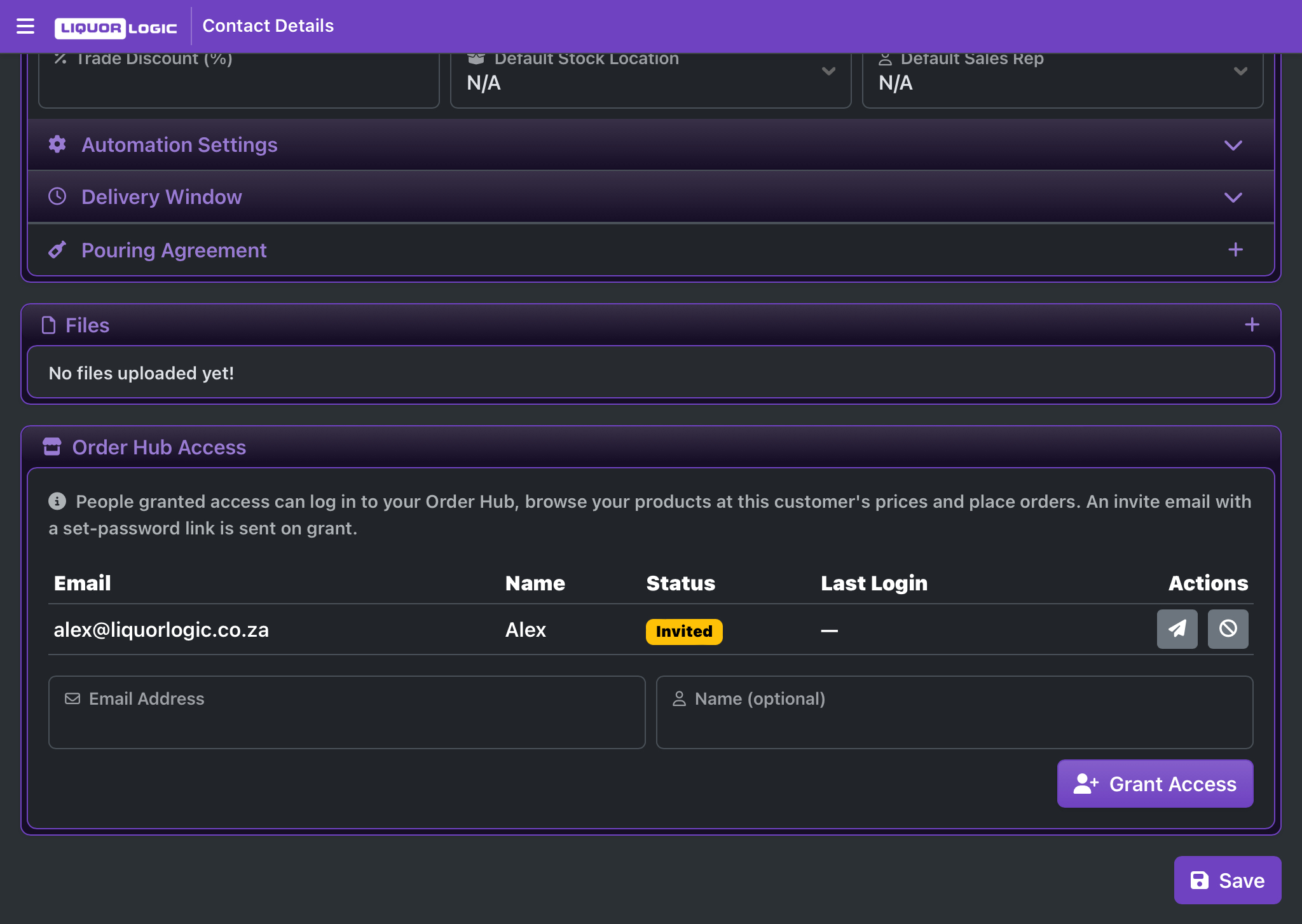
Order Hub is invite-and-approve, not open registration. A customer requests access from a public request page, and it's up to you — or the manager on your team — to approve it before that customer can log in and start ordering.
Every access request notifies your managers by email the moment it comes in, so nothing sits waiting in a queue you forgot to check. Once approved, the customer receives their own secure login to set up a password and start ordering.
- Public request-access page for prospective trade customers
- Manager approval required before any account is active
- Email notification the moment a new request comes in
- Dedicated, secure portal login — separate from your staff system
Every Order Hub Order, Clearly Flagged
Your team doesn't need to learn a separate system to handle Order Hub orders — they show up right alongside every other order, just clearly tagged so nothing gets missed.
Order Hub Badge
Every order placed through the portal is clearly badged on your staff orders list, so your team instantly knows which orders came in via Order Hub.
Live Basket Viewer
See baskets being built by your customers before they even submit — a chance to reach out proactively if something looks off, or to upsell while they're still browsing.
Catalogue Control
Choose exactly which products are made available to wholesale ordering, with dedicated product images for the portal's catalogue view.
Pending Requests
See every outstanding access request in one place, and approve or decline them without leaving your settings.
Automatic Notifications
Your managers are emailed for new access requests, and customers get confirmation emails at every step — invites, password resets, and go-live.
Secure by Design
Customer logins are entirely separate from your staff accounts, so there's no risk of a customer login ever touching the rest of your system.
Frequently Asked Questions — Order Hub
Explore Other Features
Stop Taking Wholesale Orders Over the Phone
Give your trade customers a portal of their own, and let every order land straight in your system — ready to fulfil.