Real Bookkeeping and Staff Management, Built Right Into Your POS
Stop juggling separate accounting and HR tools. Liquor Logic tracks every expense and bill, runs your payroll straight off your roster, reconciles your bank statement, and turns all of it into a real Profit & Loss, Balance Sheet, and Cash Flow report — all from the same system you already use to run your floor.
One Subscription, Not Three Different Systems
Your sales, expenses, rosters, and payroll already live in Liquor Logic — the Finance & Staff Suite just makes sense of them, instead of asking you to re-type everything into a separate bookkeeping or HR tool.
Expenses & Bills
Capture every cost as it happens, scan receipts instead of typing them, and track what you owe until it's paid.
Bank Reconciliation
Upload your bank statement and let it match against what you've already recorded — automatically.
Payroll
Hourly and salaried staff, overtime, leave, and payslips — run from the same system as your roster.
Real Reports
Profit & Loss, Balance Sheet, and Cash Flow — built on an actual general ledger, not a spreadsheet guess.
Every Cost Captured, Categorised, and Ready for Tax Time
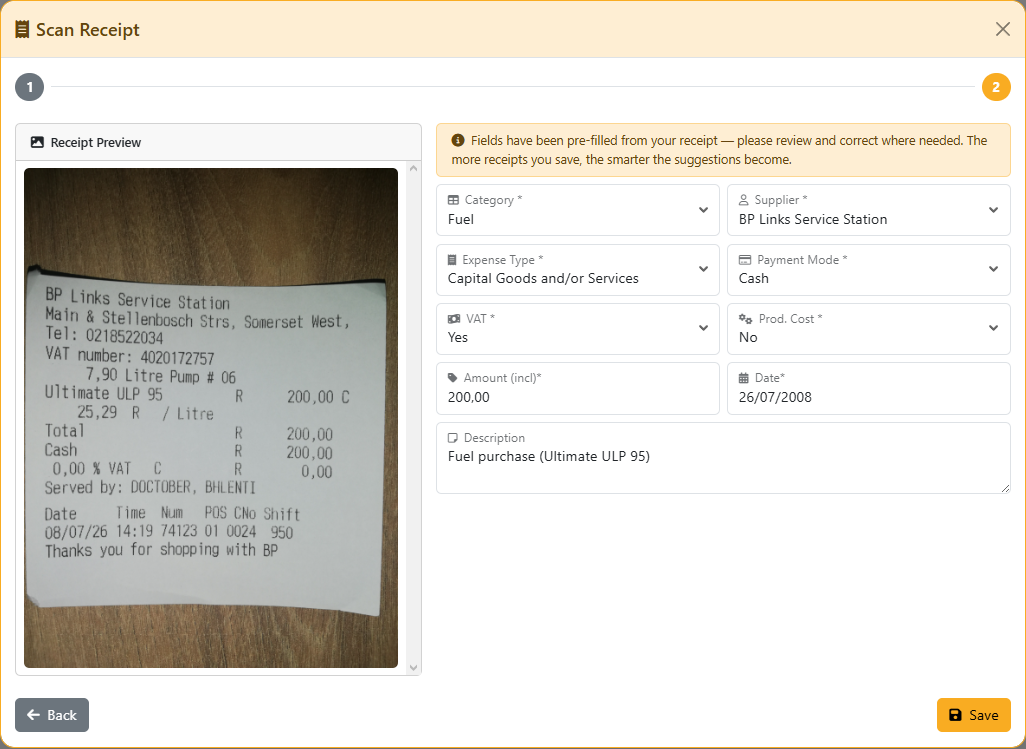
Snap a photo of a receipt and let it fill in the amount, date, and supplier for you — no more shoeboxes of paper or forgotten fuel slips. Recurring costs like rent, insurance, and subscriptions get set up once as Bills, which sit on your Balance Sheet as owed until you mark them paid.
Link an expense to the bank account it was actually paid from, and it's ready to match automatically the next time you reconcile — no manual bookkeeping catch-up at month end.
- Scan a receipt instead of typing it in
- Recurring Bills auto-spawn their next period once paid
- Categorise by account for meaningful reporting, not one lump total
- Attach the actual invoice/receipt file to every record
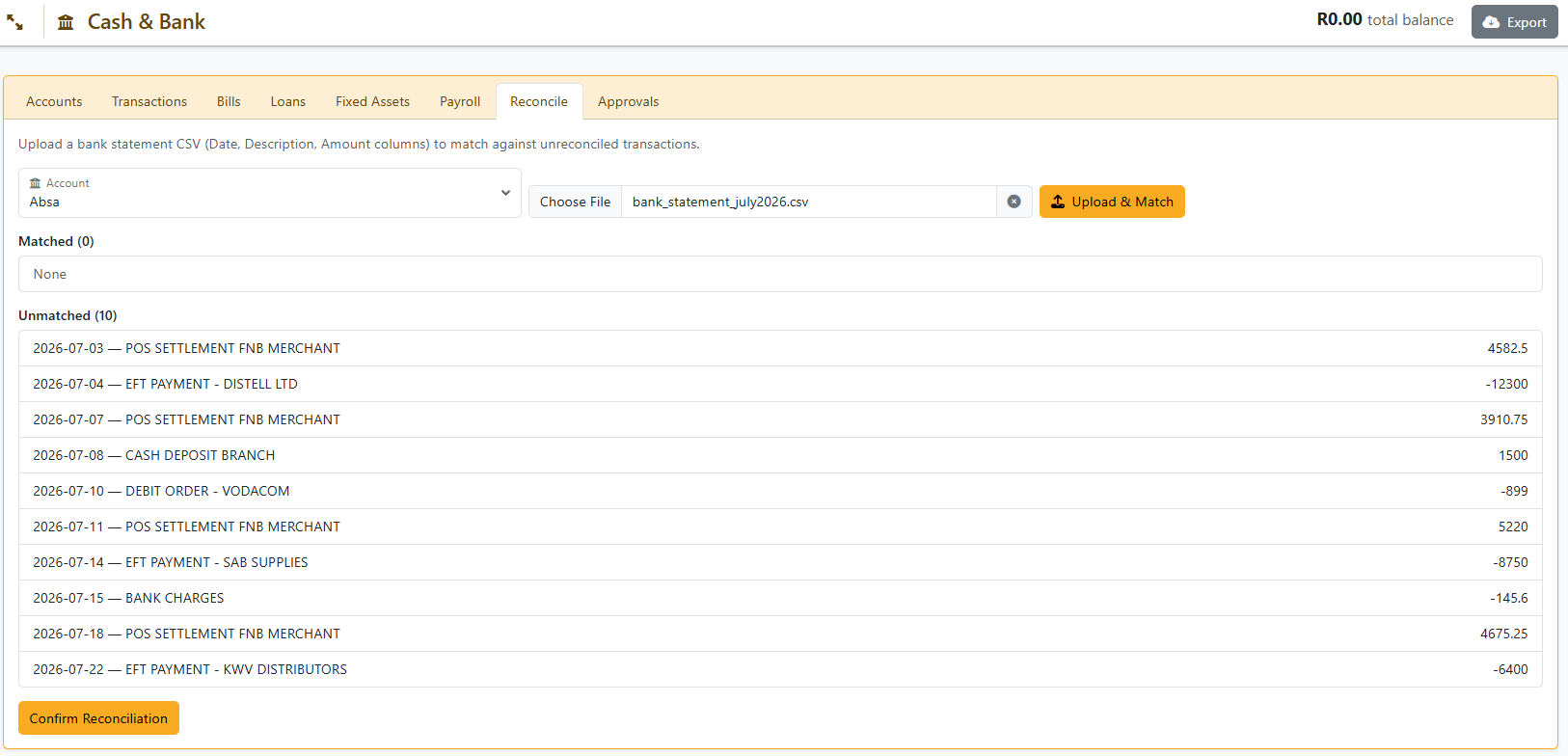
Upload a Statement, Not a Weekend
Export a CSV from your bank and upload it — Liquor Logic matches each line against what you've already recorded by amount and date, so a real reconciliation takes minutes instead of an afternoon. Anything that doesn't match gets flagged clearly instead of silently getting lost in a spreadsheet.
For whatever's left over, Auto-Categorize takes a first pass on its own — explaining bank deposits and payments against your existing records wherever it confidently can — before asking you to confirm anything it's unsure about.
- Upload once, matched automatically against existing records
- Auto-Categorize clears the routine matches for you
- Nothing gets double-counted — already reconciled lines are protected
- A clear view of exactly what still needs your eyes
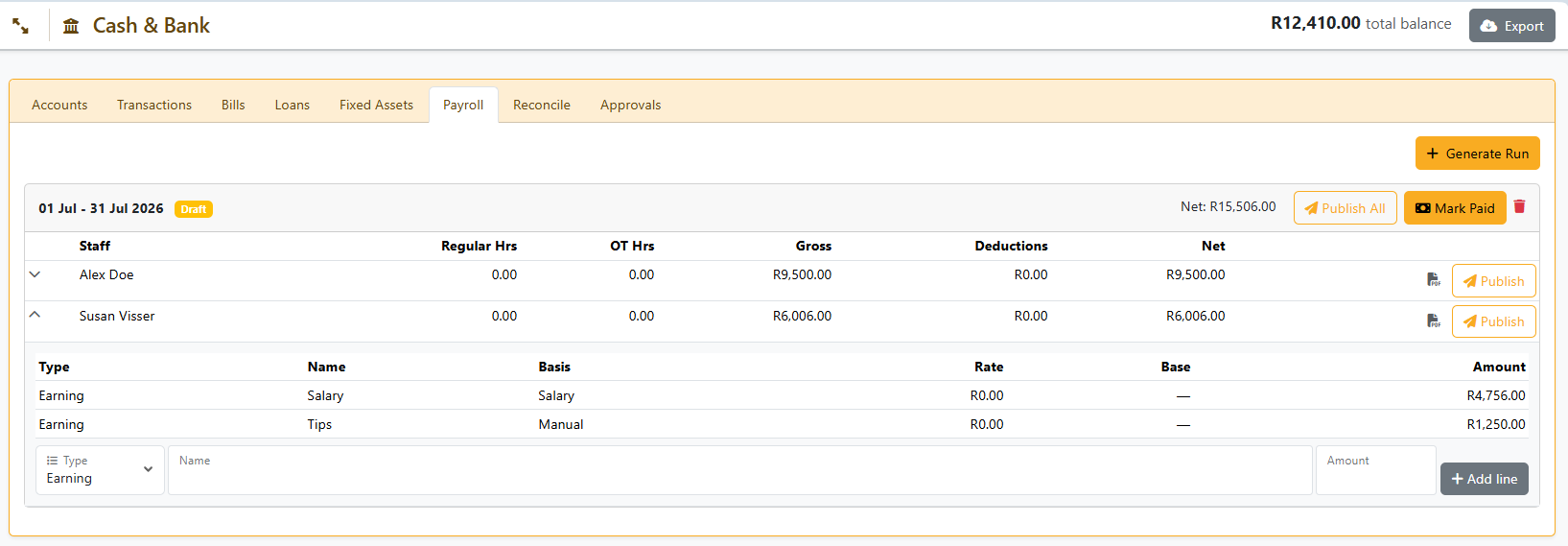
Pay Your Team Without a Second System
Hourly staff get paid from the hours they actually clocked or were rostered — no manual timesheet reconciliation. Salaried staff are paid their fixed amount every cycle, regardless of hours worked, with those hours still shown on their payslip for reference.
Every employee can carry their own commission, tips, or bonus structure, and their own deductions — all effective-dated, so a raise you enter today never rewrites a payslip you already generated for last month.
- Hourly and salaried staff, side by side, paid correctly
- Sunday and public holiday pay multipliers, where you need them
- Per-employee earnings and deductions, not a one-size template
- Payslips published straight to each employee's own portal
Your Team's Schedule, Built Right Into the Same System
The same staff working your shifts are the ones on your payroll — so Liquor Logic keeps scheduling, attendance, timesheets, and pay in the same place. Build the roster, let staff clock in on a dedicated kiosk, and approve hours without ever leaving the platform.
Roster & Shift Scheduling
Build weekly rosters with shift templates, copy-week, and recurring shifts. Publish a roster and staff are notified by email automatically.
Time Clock Kiosk
A dedicated clock-in screen — PIN or fingerprint — separate from the POS login, so staff can clock in and out without touching your till session.
Timesheets & Approvals
Rostered vs. actual hours, configurable rounding, and automatic overtime calculation. Manager sign-off locks a week's timesheet once approved.
Leave & Team Calendar
Staff request leave, managers approve it, and a shared team calendar shows who's off — flagged automatically against the roster.
Shift Swaps
Staff can offer a shift to a named colleague, who accepts or declines right from their own device — no manager back-and-forth required.
My Shifts — Self-Service
Every staff member gets their own page to see upcoming shifts, request leave, and manage swaps — no admin access required.
Built On a Real Ledger, Not a Guess
Every expense, bill, payroll run, and reconciled transaction posts to an actual double-entry Chart of Accounts underneath — so the reports you see are the same numbers your accountant would sign off on.
Profit & Loss
Sales minus every expense, for any period — categorised by account, not one lump total.
Balance Sheet
Your cash position, what's owed to you, what you owe, inventory value, and fixed assets — all in one view.
Cash Flow
A monthly rollup of real money movement — the one report driven purely by what actually happened in your bank.
Budget vs Actuals
Set a budget per account and track how the year is actually tracking against it, month by month.
Tax Filing Calendar
Every filing deadline tracked automatically, with the numbers behind each one right where you need them.
Period Lock & Approvals
Close a reconciled month so nothing back-dates into it by accident, with approval sign-off on larger transactions.
Frequently Asked Questions — Finance & Staff Suite
Explore Other Features
Stop Reconciling Your Books in Two Different Systems
Expenses, bills, payroll, bank reconciliation, and real financial reports — all from the same place you already run your business.